> E-commerce Catalog Monitoring Pipeline (Python, Playwright)
// Created at: 24-09-2026
[Project Overview]
An end-to-end data collection pipeline that captures an online retailer's complete product catalog (brand, name, price, link, image) and delivers it as an up-to-date Excel file in a shared Google Drive folder, automatically, on a configurable schedule. The challenge Modern shop pages rarely expose their whole catalog at once. Products load as you scroll, cookie banners block interaction, and the data you want is spread across the interface. A one-off script that "scrapes the page" tends to break quietly or return only the first screenful of products. The goal was a pipeline that captures the entire catalog and keeps working without supervision. Skills: Python · Playwright · Web scraping · pandas · Google Drive API (OAuth) · Automation · Scheduling
[_Case Study]
Investigate before building
A separate discovery script opens the page once and logs all network traffic. It parses every JSON response and recursively searches it for structures that look like product lists (objects with a name-like and a price-like field), then saves a screenshot, the page HTML and a log of candidates. The extraction method is chosen from this evidence: an internal API if one exists, otherwise structured data in the rendered page.
def looks_like_product_list(data) -> bool:
    if not isinstance(data, list) or len(data) < 2 or not isinstance(data[0], dict):
        return False
    keys = [k.lower() for k in data[0]]
    has_price = any(k in keys for k in ("price", "cost", "amount"))
    has_name = any(k in keys for k in ("name", "title", "product"))
    return has_price and has_name


def find_product_lists(node, found: list, path: str = ""):
    """Search anywhere in a JSON tree for lists that look like products."""
    if isinstance(node, dict):
        for key, value in node.items():
            find_product_lists(value, found, f"{path}.{key}" if path else key)
    elif isinstance(node, list):
        if looks_like_product_list(node):
            found.append({"path": path, "count": len(node), "sample": node[0]})
        for i, item in enumerate(node[:5]):   # don't descend into huge lists
            find_product_lists(item, found, f"{path}[{i}]")
Extract from the cleanest source available
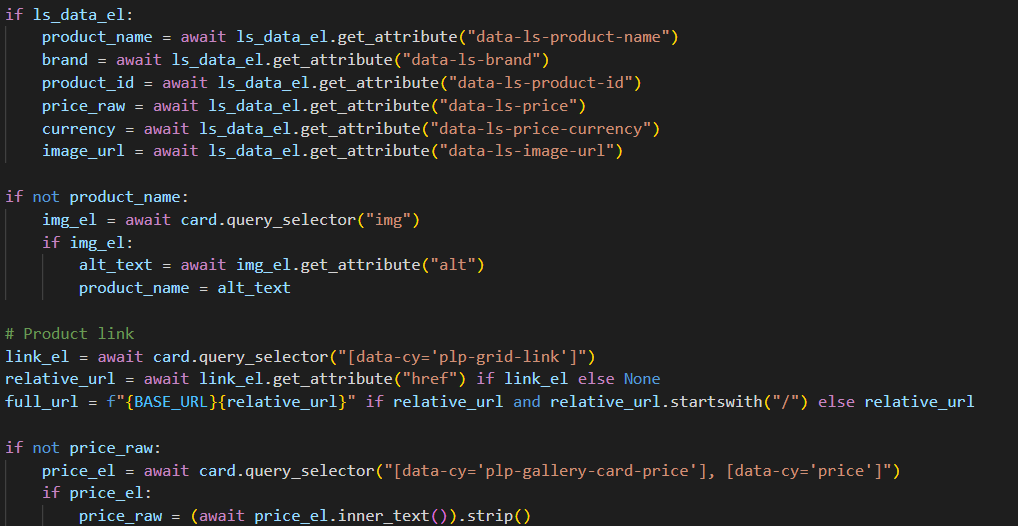
Each product card carries structured data attributes (name, brand, ID, price, currency, image). The scraper reads those first and falls back to the image alt text and the visible price only if an attribute is missing. Prices like 26 999 kr are normalized into integers, so the output is ready for analysis, not just for reading.
def parse_price_to_int(text: str):
    """'26 999 kr' -> 26999"""
    digits = re.sub(r"\D", "", text or "")
    return int(digits) if digits else None


async def read_card(card) -> dict:
    meta = await card.query_selector("[data-product-name]")
    name = await meta.get_attribute("data-product-name") if meta else None
    price = await meta.get_attribute("data-price") if meta else None

    if not name:                          # fallback 1: image alt text
        img = await card.query_selector("img")
        name = await img.get_attribute("alt") if img else None

    if not price:                         # fallback 2: visible price text
        el = await card.query_selector("[data-price-text]")
        price = (await el.inner_text()).strip() if el else None

    return {"name": name, "price": parse_price_to_int(price)}
Load the whole catalog
Instead of fixed delays, a paced scroll loader repeats small, irregular scrolls with pauses and counts the product cards after every round. When the count stops growing for several consecutive rounds, it takes one long final pause as a last check, then declares the catalog complete. A hard cap on the number of rounds prevents endless loops, and reaching it is logged as a warning.
async def load_full_catalog(page, card_selector, max_rounds=150, stable_to_stop=5):
    previous, stable = 0, 0

    for _ in range(max_rounds):
        for _ in range(random.randint(2, 4)):          # small, irregular scrolls
            await page.mouse.wheel(0, random.randint(200, 400))
            await asyncio.sleep(random.uniform(0.2, 0.5))
        await asyncio.sleep(random.uniform(1.8, 3.2))  # let lazy loading react

        count = len(await page.query_selector_all(card_selector))
        if count > previous:
            previous, stable = count, 0
            continue

        stable += 1
        if stable == stable_to_stop - 1:
            await asyncio.sleep(8)                     # one long pause before giving up
        if stable >= stable_to_stop:
            break                                      # count stabilized: catalog complete
    else:
        log.warning("Safety limit reached; catalog may be incomplete")

    return previous
Deliver automatically
The result is written to Excel and uploaded to a shared Google Drive folder through OAuth. If a file with the same name already exists in the folder, it is updated in place, so the people using it always open the same, current file.
def upload_or_update(service, local_path: str, folder_id: str) -> str:
    name = os.path.basename(local_path)
    safe = name.replace("\\", "\\\\").replace("'", "\\'")

    existing = service.files().list(
        q=f"name='{safe}' and '{folder_id}' in parents and trashed=false",
        fields="files(id)",
    ).execute().get("files", [])

    media = MediaFileUpload(local_path, resumable=True)

    if existing:                                       # update in place
        file_id = existing[0]["id"]
        service.files().update(fileId=file_id, media_body=media).execute()
        return file_id

    created = service.files().create(                  # first run: create
        body={"name": name, "parents": [folder_id]},
        media_body=media, fields="id",
    ).execute()
    return created["id"]
Run unattended
A scheduler runs the cycle at a configurable interval. Each run is wrapped so that one failure (network issue, layout change, upload error) is logged and does not stop the runs after it. All settings live in environment variables, validated at startup.
def run_once():
    """One full cycle. A failure here must never stop the scheduler."""
    try:
        output_path = asyncio.run(run_scrape())
        if output_path:
            upload_file_to_drive(output_path)
            log.info("Cycle completed")
        else:
            log.warning("No data scraped; upload skipped")
    except Exception:
        log.exception("Cycle failed; the next scheduled run will retry")


def main():
    if errors := validate_config():
        for err in errors:
            log.error("Config error: %s", err)
        return

    interval_seconds = SCRAPE_INTERVAL_HOURS * 3600
    while True:
        run_once()
        time.sleep(interval_seconds)
Key design decisions
• Evidence over guesswork: the discovery step exists so the extraction strategy is based on what the site actually does. • Layered fallbacks: one missing attribute on one card should not lose a product. • Stop condition based on behavior, not time: the loader reacts to whether new products keep appearing instead of waiting a fixed number of seconds. • Failure isolation: a scheduled job that dies on its first error is worse than no job.